> ## Documentation Index
> Fetch the complete documentation index at: https://sequence-0fb8d9e6-api_docs.mintlify.site/llms.txt
> Use this file to discover all available pages before exploring further.

# Launching Your Hosted Marketplace with Sequence Builder

> Follow this 8-step guide to learn how to use the Sequence Builder which offers developers a white-label marketplace that can be easily customized and integrated into any onchain experience without any coding experience needed.

## Watch a Marketplace Launch in Minutes

Watch as a Sequence team member curates both Skyweaver and Azuki into a custom marketplace by customizing themes and features in the Sequence Builder.

<Frame>
  <video controls className="w-full aspect-video" src="https://mintcdn.com/sequence-0fb8d9e6-api_docs/g8nNHgFQYwRFtMql/video/builder/07_Marketplace.mp4?fit=max&auto=format&n=g8nNHgFQYwRFtMql&q=85&s=93371ead368dbadbfd391cde0c422286" data-path="video/builder/07_Marketplace.mp4" />
</Frame>

## Launch a Marketplace

<Note>
  Get started quickly at [Sequence Builder](https://sequence.build/) to launch your marketplace.
</Note>

Follow this 8-step guide to customize and launch a white-label marketplace in minutes with a set of EVM based collectibles.

<Steps>
  <Step title="Create Project">
    Complete [steps 1-5 of the following guide to create a project](/solutions/builder/getting-started#get-started).
  </Step>

  <Step title="Optional: Create Collectible">
    If you already have a Collectible, skip to the next step, or, complete [the following guide to create a collectible](/solutions/builder/contracts/deploy-an-item-collection) and [add a collection to your collectible](/solutions/builder/collections) to include on your marketplace.
  </Step>

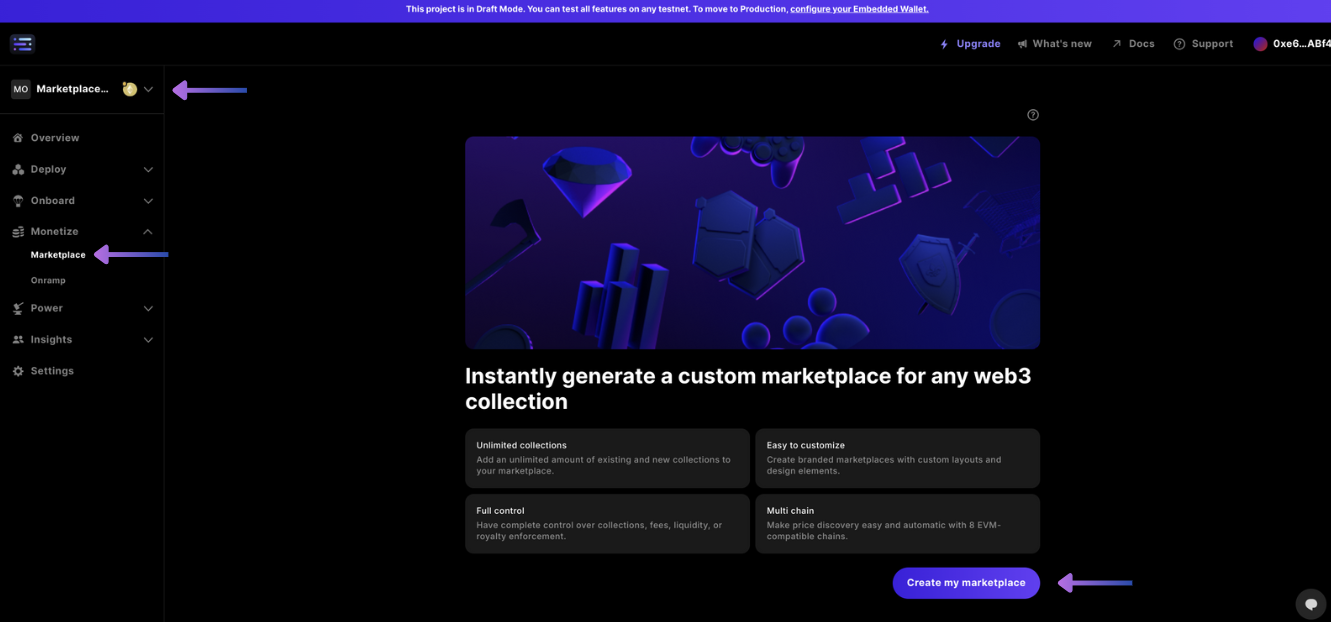
  <Step title="Deploy White-label Marketplace">
    After accessing your project, and the `Marketplace` nav tab in the `Monetize` dropdown, select `Create my marketplace`

    <Frame>
      <img src="https://mintcdn.com/sequence-0fb8d9e6-api_docs/wfcaeZqQjoQL43dt/images/marketplace/builder_deploy_new_marketplace.png?fit=max&auto=format&n=wfcaeZqQjoQL43dt&q=85&s=9bb87a7c814a760acbf05e3b33d3e71b" alt="deploy new marketplace" width="1331" height="622" data-path="images/marketplace/builder_deploy_new_marketplace.png" />
    </Frame>
  </Step>

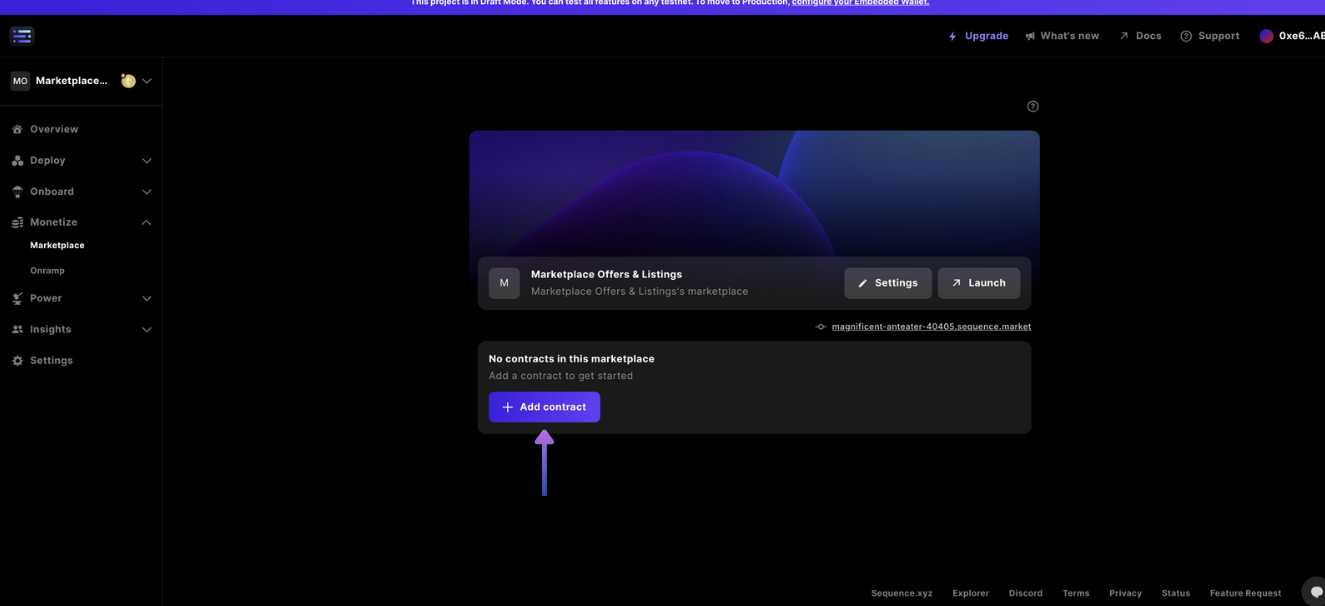
  <Step title="Add a Collectible to Marketplace">
    Next, select the `+ Add contract` button, and copy and paste a contract address into the field to search and include on the marketplace.

    <Frame>
      <img src="https://mintcdn.com/sequence-0fb8d9e6-api_docs/wfcaeZqQjoQL43dt/images/marketplace/builder_add_new_contract_to_marketplace.png?fit=max&auto=format&n=wfcaeZqQjoQL43dt&q=85&s=313376f43b4420ccc8f3bce174a82bfb" alt="add new contract to marketplace" width="1325" height="606" data-path="images/marketplace/builder_add_new_contract_to_marketplace.png" />
    </Frame>

    Repeat this step until you are happy with your marketplace curation.
  </Step>

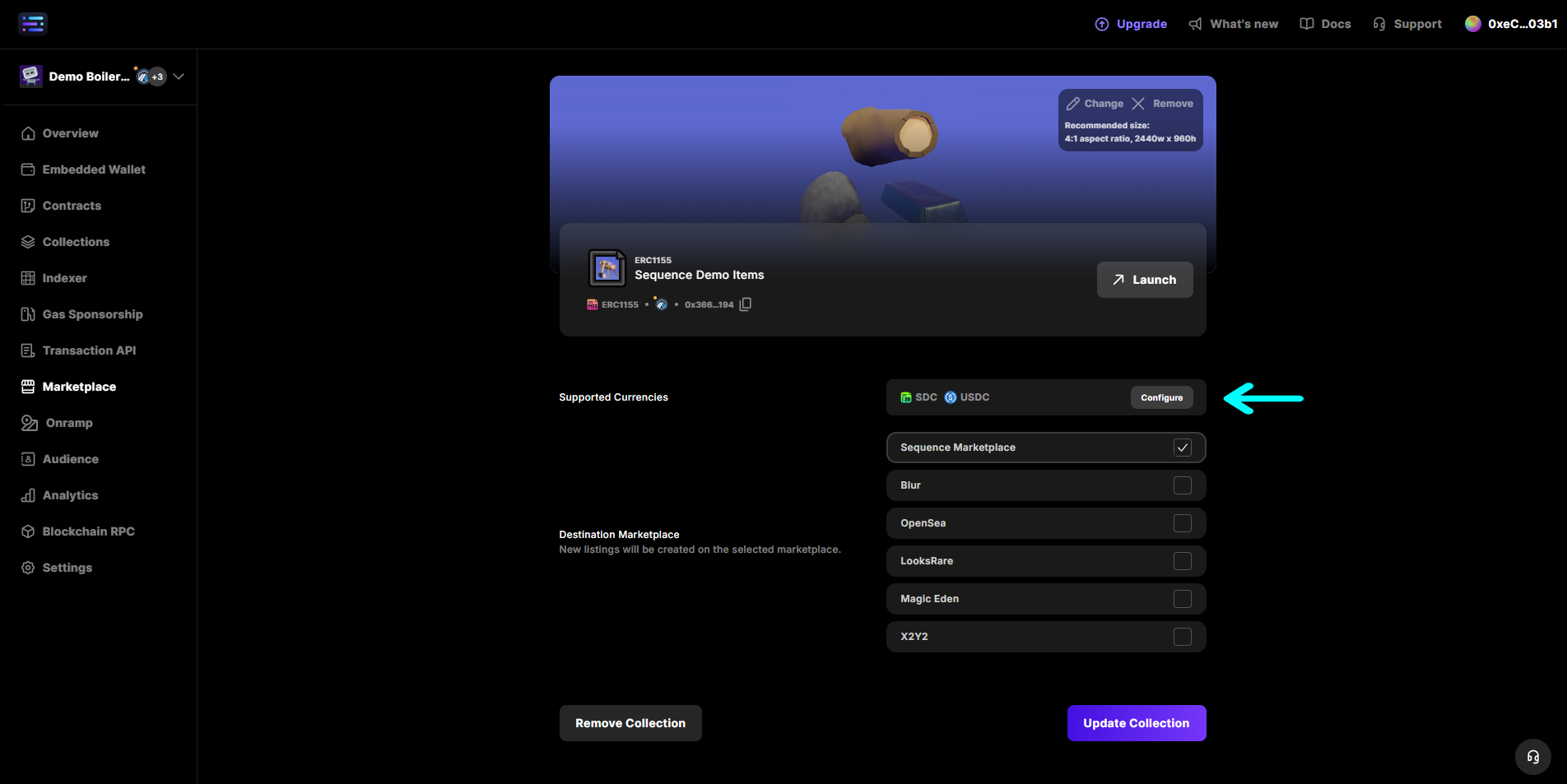
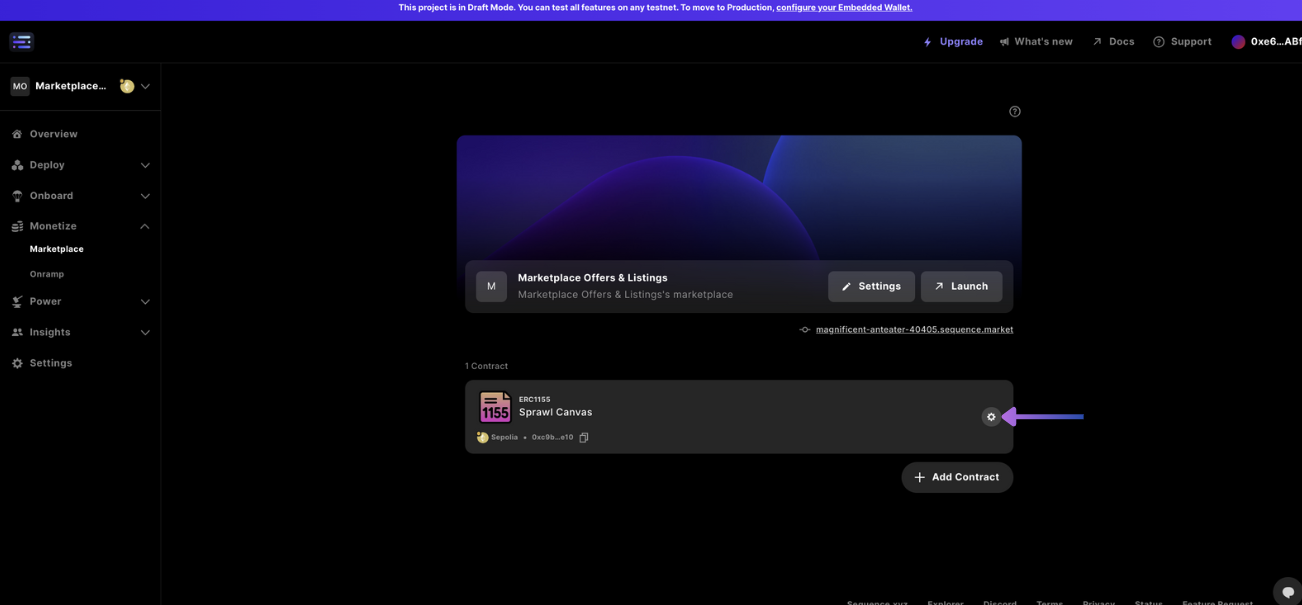
  <Step title="Add Supported Currencies">
    Add a currency to transact with on the marketplace, by first accessing settings for a collectible:

    <Frame>
      <img src="https://mintcdn.com/sequence-0fb8d9e6-api_docs/wfcaeZqQjoQL43dt/images/marketplace/builder_marketplace_update_settings_of_collectible.png?fit=max&auto=format&n=wfcaeZqQjoQL43dt&q=85&s=a605834a1ca3656f9e0173945a2d6d79" alt="access collectible settings" width="1302" height="605" data-path="images/marketplace/builder_marketplace_update_settings_of_collectible.png" />
    </Frame>

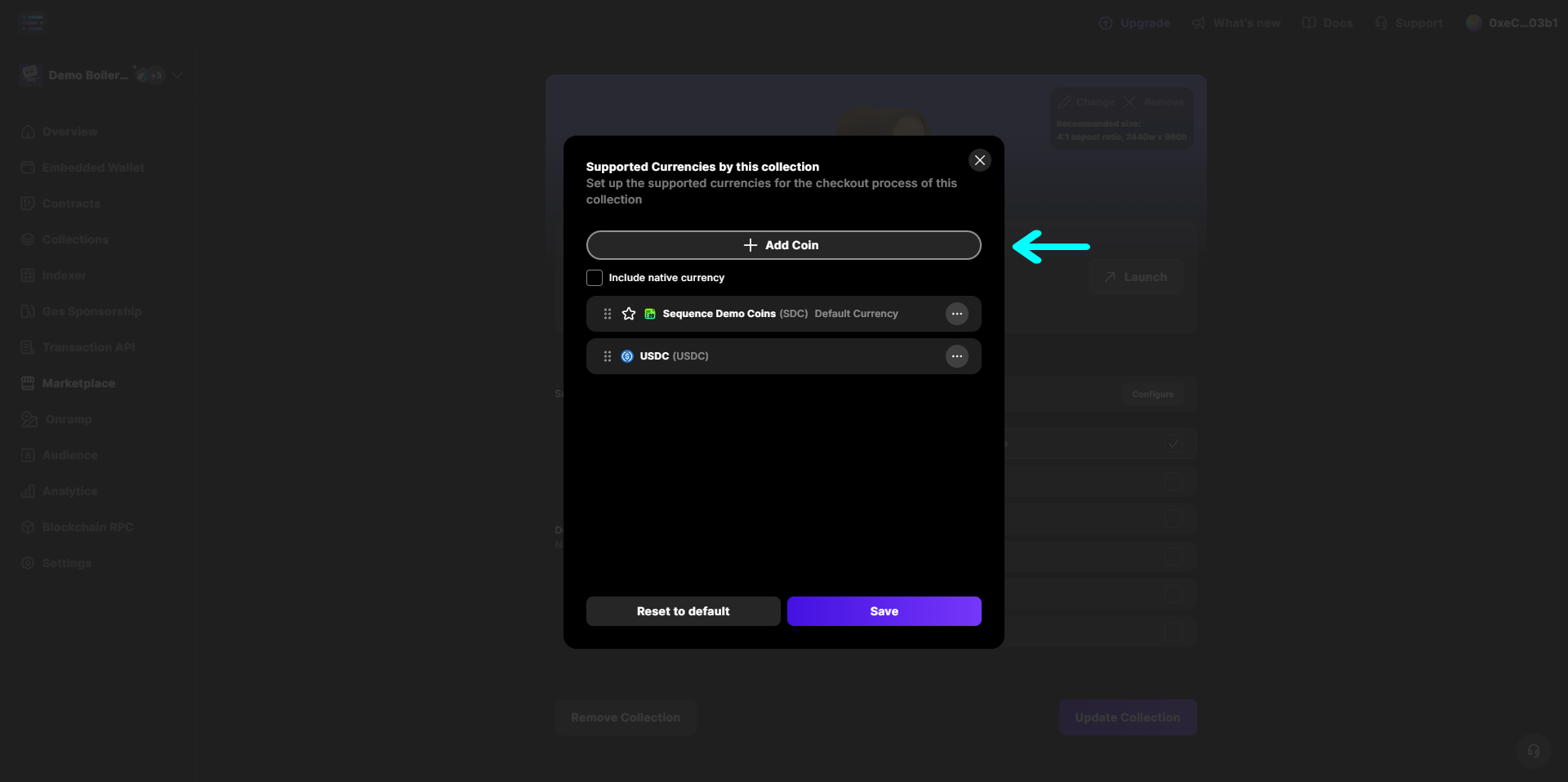
    Then add new custom currency:

    <Frame>
      <img src="https://mintcdn.com/sequence-0fb8d9e6-api_docs/wfcaeZqQjoQL43dt/images/marketplace/builder_add_new_custom_currency.png?fit=max&auto=format&n=wfcaeZqQjoQL43dt&q=85&s=9c04789540d753c8b820b285573b6d3e" alt="add new custom currency" width="1904" height="953" data-path="images/marketplace/builder_add_new_custom_currency.png" />
    </Frame>

    Input a currency token into the search field:
    <Frame>
      <img src="https://mintcdn.com/sequence-0fb8d9e6-api_docs/wfcaeZqQjoQL43dt/images/marketplace/builder_add_new_custom_currency_2.png?fit=max&auto=format&n=wfcaeZqQjoQL43dt&q=85&s=2c532290b309329abd5c72204bc12d13" alt="add new custom currency" width="1920" height="957" data-path="images/marketplace/builder_add_new_custom_currency_2.png" />
    </Frame>

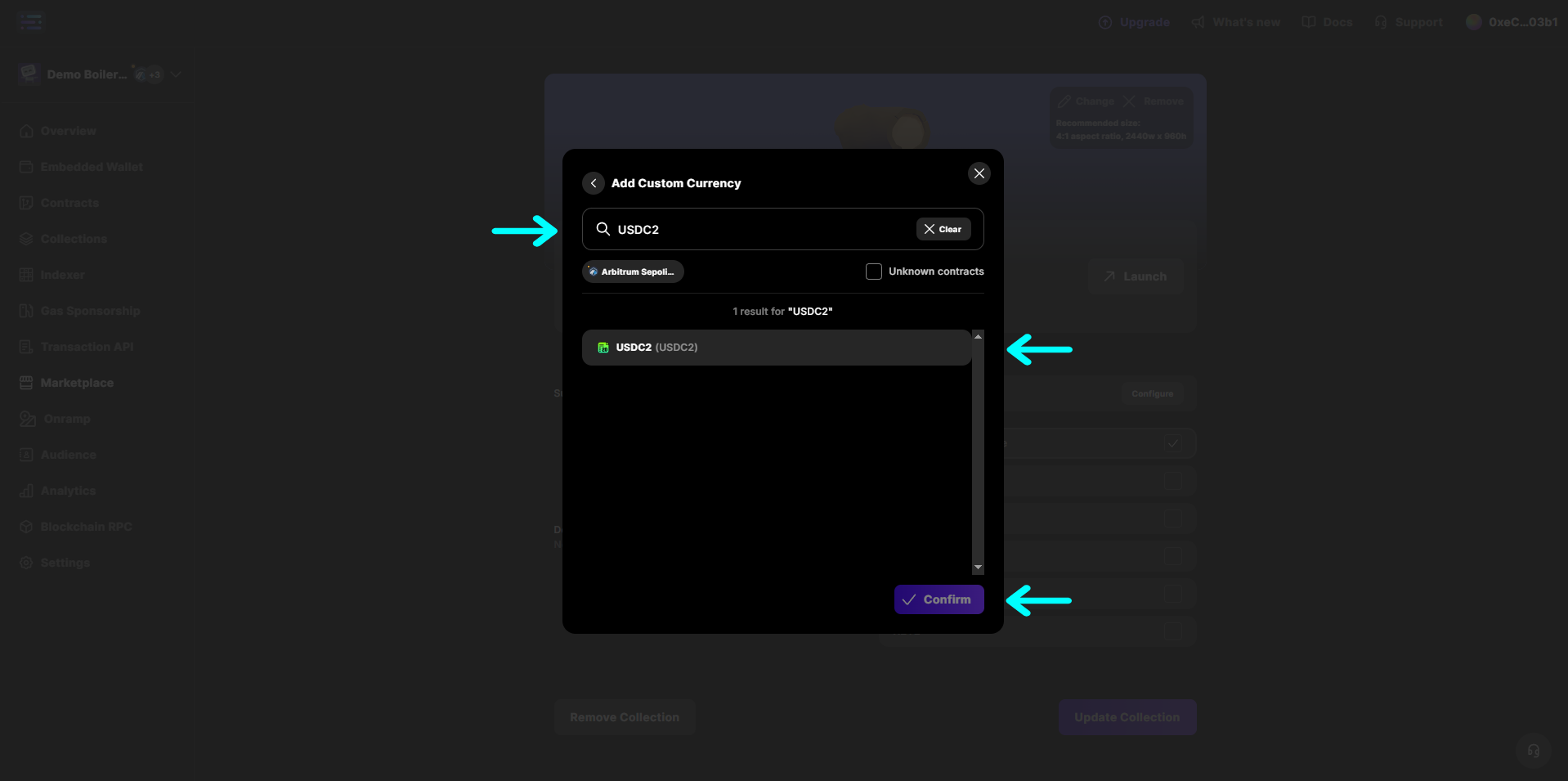
    Select the currency, then confirm and save it:
    <Frame>
      <img src="https://mintcdn.com/sequence-0fb8d9e6-api_docs/wfcaeZqQjoQL43dt/images/marketplace/builder_add_new_custom_currency_3.png?fit=max&auto=format&n=wfcaeZqQjoQL43dt&q=85&s=2841273ae91bd0fbbc4f7075a3925178" alt="add new custom currency" width="1918" height="955" data-path="images/marketplace/builder_add_new_custom_currency_3.png" />
    </Frame>
  </Step>

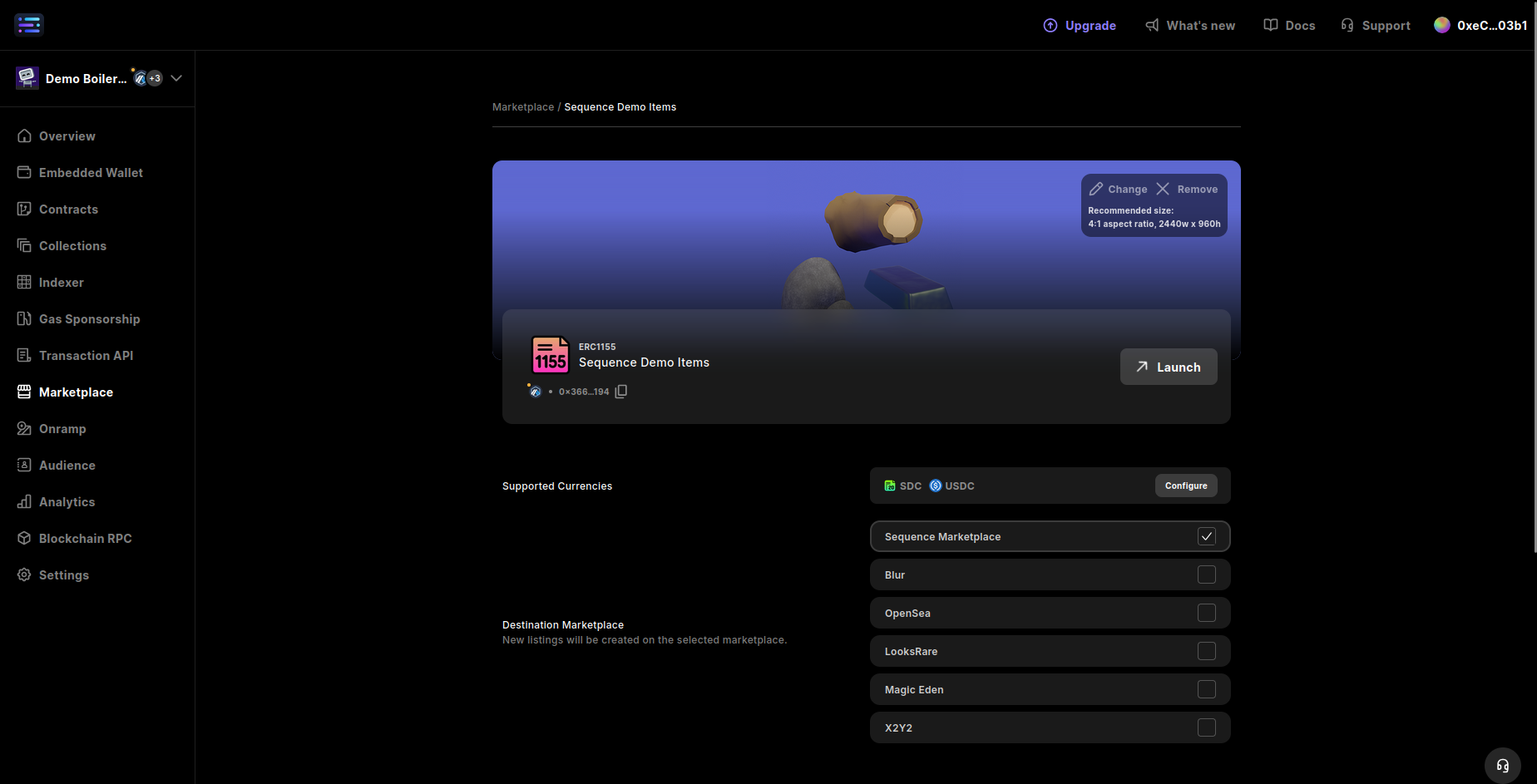
  <Step title="Choose Marketplace Destination">
    For each collectible, select the destination marketplace where new listings will be created.

    <Frame>
      <img src="https://mintcdn.com/sequence-0fb8d9e6-api_docs/wfcaeZqQjoQL43dt/images/marketplace/builder_markeplace_setting_update_marketplace_type.png?fit=max&auto=format&n=wfcaeZqQjoQL43dt&q=85&s=609b87f5fb6384e52b89f82b0e3dfce2" alt="choose marketplace type" width="1848" height="943" data-path="images/marketplace/builder_markeplace_setting_update_marketplace_type.png" />
    </Frame>

    #### Sequence Market

    This marketplace type enables users to create custom listings and offers on a decentralized orderbook, available for anyone to partake in commerce, allowing for time expiry of orders, custom pricing, and ERC20 custom currency types, as well as other features.

    All your NFTs can be configured to list directly on other marketplaces such as Magic Eden, OpenSea, and more. In that case, they will no longer be listed by default on the Sequence Marketplace, but Sequence will still detect and display them seamlessly. This setup gives you full flexibility over distribution while keeping your NFTs visible both on your custom marketplace and across the broader NFT ecosystem.

    | Marketplace          | Listings | Offers | Chains Supported                                                                                                                                                                                                                                                                                                                                                                                                                                                                                                                                                                                                                                                                                                                                                                                | NFTs will appear on                                                                             |
    | -------------------- | -------- | ------ | ----------------------------------------------------------------------------------------------------------------------------------------------------------------------------------------------------------------------------------------------------------------------------------------------------------------------------------------------------------------------------------------------------------------------------------------------------------------------------------------------------------------------------------------------------------------------------------------------------------------------------------------------------------------------------------------------------------------------------------------------------------------------------------------------- | ----------------------------------------------------------------------------------------------- |
    | Sequence Marketplace | ✅        | ✅      | **Mainnet:** Ethereum, Optimism, Telos, BNB Smart Chain, Gnosis Chain, Polygon, XR1, Polygon zkEVM, Moonbeam, Soneium, LAOS, The Root Network, B3, Base, Immutable zkEVM, Oasys Homeverse, ApeChain, Arbitrum One, Arbitrum Nova, Etherlink, Avalanche, Blast, Xai, Skale Nebula Gaming Hub<br /><br />**Testnet:** Telos Testnet, BNB Smart Chain Testnet, Moonbase Alpha, Minato Soneium Testnet, B3 Sepolia, XR Sepolia, The Root Network Porcini Testnet, Monad Testnet, Immutable zkEVM Testnet, ApeChain Testnet, Oasys Homeverse Testnet, Avalanche Testnet, Somnia Testnet, Frequency Testnet, LAOS Sigma Testnet, Amoy Testnet, Base Sepolia, Etherlink Testnet, Arbitrum Sepolia, Sepolia, Optimism Sepolia, TOY Testnet, Skale Nebula Gaming Hub Testnet, Blast Sepolia, Xai Sepolia | The domain of your configured marketplace on [https://sequence.build/](https://sequence.build/) |
    | OpenSea              | ✅        | ✅      | **Mainnet:** Ethereum, Optimism, BNB Smart Chain, Polygon, Soneium, B3, Base, ApeChain, Arbitrum, Avalanche, Blast, Xai<br /><br />**Testnet:** Minato Soneium Testnet, Monad Testnet, Apechain Testnet, Amoy Testnet, Base Sepolia, Sepolia                                                                                                                                                                                                                                                                                                                                                                                                                                                                                                                                                    | [https://opensea.io/en](https://opensea.io/en)                                                  |
    | Magic Eden           | ✅        | ✅      | **Mainnet:** Ethereum, Optimism, BNB Smart Chain, Polygon, Soneium, B3, Base, ApeChain, Arbitrum, Avalanche, Blast, Xai<br /><br />**Testnet:** Minato Soneium Testnet, Monad Testnet, Apechain Testnet, Amoy Testnet, Base Sepolia, Sepolia                                                                                                                                                                                                                                                                                                                                                                                                                                                                                                                                                    | [https://magiceden.io/](https://magiceden.io/)                                                  |
  </Step>

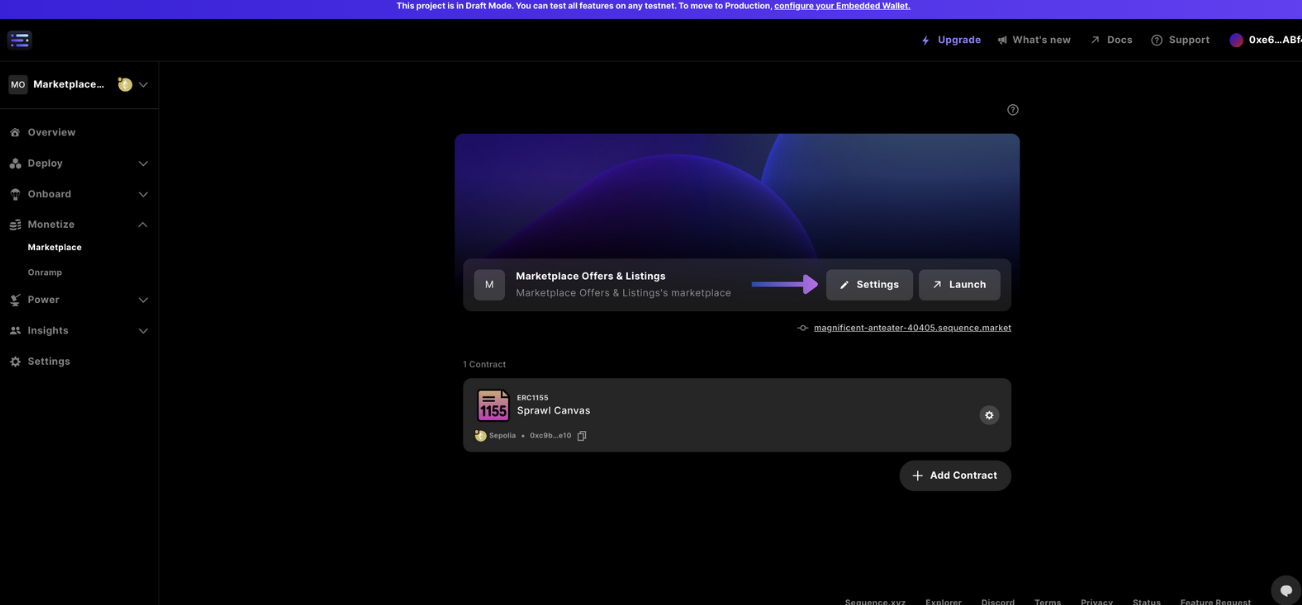
  <Step title="Update Marketplace Settings">
    Open marketplace settings to update configuration

    <Frame>
      <img src="https://mintcdn.com/sequence-0fb8d9e6-api_docs/wfcaeZqQjoQL43dt/images/marketplace/builder_marketplace_update_settings.png?fit=max&auto=format&n=wfcaeZqQjoQL43dt&q=85&s=a0a9eb24ef10d40009ee564ad8e0a6bf" alt="marketplace settings" width="1302" height="605" data-path="images/marketplace/builder_marketplace_update_settings.png" />
    </Frame>

    <Accordion title="General">
      ##### `Marketplace Name`

      Edit and update the marketplace name, located in the top left hand corner, over the banner, and in the webpage document title (i.e. the browser tab title).

      ##### `Landing Banner`

      Edit and update the banner image that is located in the top of marketplace, reaching horizontally across the marketplace page.

      ##### `Description`

      Add a descripiton to be featured on top of the banner.

      ##### `Website`

      Add an external website to link to.

      ##### `Discord`

      Add a Discord server to be linked to with an icon.

      ##### `X`

      Add an X profile to be linked to with an icon.

      ##### `Instagram`

      Add an Instagram account to be linked to with an icon.

      ##### `YouTube`

      Add an YouTube page to be linked to with an icon.

      ##### `TikTok`

      Add an TikTok to be linked to with an icon.
    </Accordion>

    <Accordion title="Appearance">
      ##### `Header Logo`

      Update the header logo of the marketplace at the top of the screen.

      ##### `Favicon`

      Update the favicon logo for the website to be displayed in the tab of the browser.
    </Accordion>

    <Accordion title="Advanced">
      ##### `Custom Subdomain`

      Add a custom domain so that users can access the marketplace from a public URL of your choosing that is not randomly generated.

      ##### `Select Sequence Wallet Type`

      Select wallet type [Sequence Embedded Wallet](/solutions/wallets/developers/embedded-wallet/overview).

      ##### `Enable Multiple Supported Wallets`

      Add various other community based wallets, like Metamask or Coinbase.

      ##### `Enable EIP-6963 Wallets`

      EIP-6963, titled "Multi Injected Provider Discovery," is an Ethereum Improvement Proposal that introduces a standardized method for decentralized applications (apps) to detect and interact with multiple wallet providers injected into a web page so that wallet don't overlap in the inject javascript global object.
    </Accordion>

    #### Danger zone

    ##### `Delete Marketplace`

    Delete your marketplace and all it's data, an irreversible step.
  </Step>

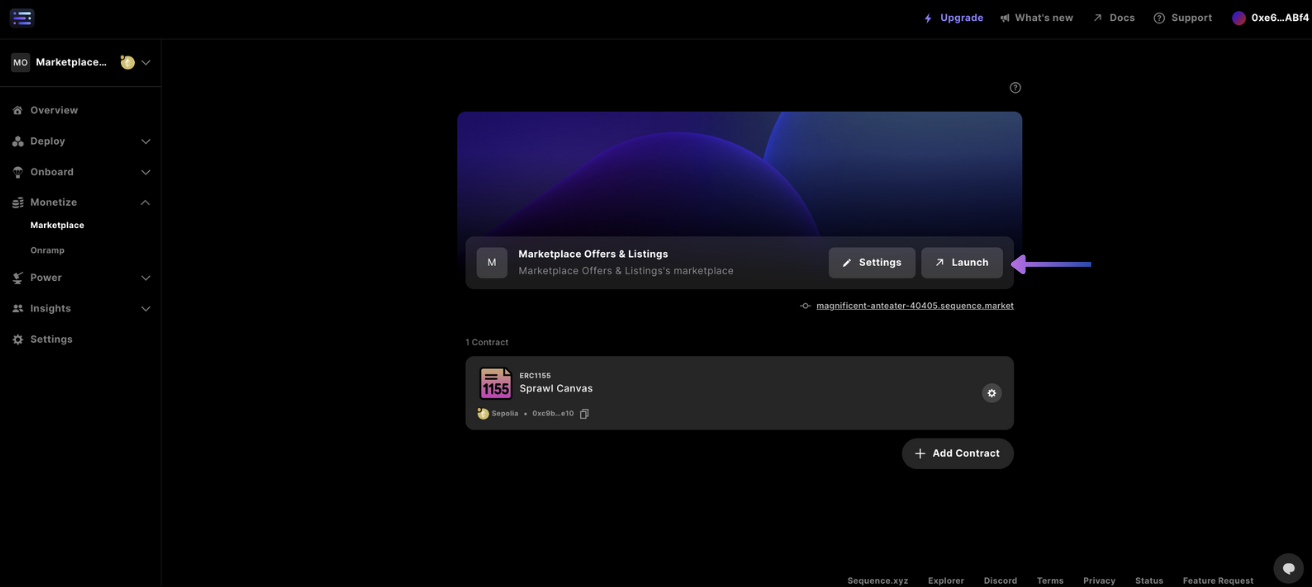
  <Step title="Launch Marketplace">
    Once you're finished, launch your marketplace and share with your friends and community!

    <Frame>
      <img src="https://mintcdn.com/sequence-0fb8d9e6-api_docs/wfcaeZqQjoQL43dt/images/marketplace/builder_marketplace_launch.png?fit=max&auto=format&n=wfcaeZqQjoQL43dt&q=85&s=2bd302cfd5fd06f96262e516e531fca4" alt="launch marketplace" width="1312" height="587" data-path="images/marketplace/builder_marketplace_launch.png" />
    </Frame>
  </Step>
</Steps>